
Details
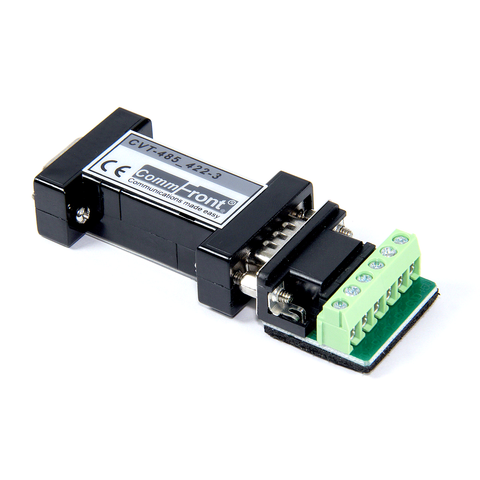
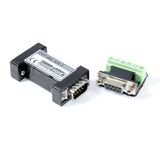
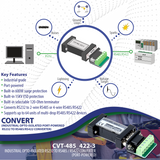
The CVT-485_422-3 is a compact, rugged, industrial-grade, optically-isolated, port-powered RS-232 to RS-485 / RS-232 to RS-422 converter, which can be used to convert any standard RS-232C port into a two-wire half-duplex RS-485 port, or a four-wire full-duplex RS485/RS422 port and vice versa. This product operates within a temperature range of -40°F to 185°F (-40°C to 85°C) and features 600W surge protection and 15kV static protection, making it an ideal solution for harsh industrial applications. It supports multi-drop RS-485/RS-422 networks and can be used to communicate with one loop of up to 64 units of RS-485/RS-422 devices. This product features 2,500V opto-isolation circuitry, which effectively protect your RS-232 devices from ground loops, noise problems, transient surges, remote lightning and spikes. The unit is efficiently powered from the RS-232 data line and it supports data direction auto-turnaround. Therefore, no external power, software drivers or flow control is required.
CommFront's products quality is ensured by our ISO-9001 quality control system (Cert No. SG12/04213, strictly certified by SGS), and we back our high-quality products with a 5-year replacement warranty and a 30-day risk-free money-back guarantee.
Features
- Rugged, industrial-grade, port-powered, opto-isolated RS232 to RS485 / RS422 converter.
- Converts RS232 to 2-wire RS485, 4-wire RS485 or 4-wire RS422 and vice versa.
- Port-powered, no external power or RTS, DTR required.
- Industrial grade enclosed in a rugged, rustless ABS housing.
- 2,500V optical isolation.
- Supports multi-drop RS485 / RS422 networks (up to 64 nodes).
- 1.2K to 38.4K Baud operation (auto-sensing & self-adjusting).
- Temperature range: -40ºF to 185ºF (-40ºC to 85ºC).
- Plug and play (hot-pluggable, data format auto-sensing & self-adjusting).
- Data direction auto-turnaround, no software drivers or flow control is required.
- Built-in selectable 120Ω terminator for system reliability and easy installation.
- Built-in 600W surge protection, 15kV static protection and circuit protection.
- Accepts external 5VDC regulated power if the port-power is insufficient.
- ALL-IN-ONE rugged terminal block designed for different requirements.
- Surface Mount Technology manufactured to RoHS and ISO-9001 standards.
- CE, FCC, RoHS, and REACH certified.
- 5-year manufacturer's warranty.
Specifications
| Part Number: | CVT-485_422-3 |
| Compatibility: | EIA/TIA RS-232C standard and RS-485 / RS-422 standard |
| Power Source: | Port power from RS232 data line |
| Current Consumption: | Less than 10mA |
| Optical Isolation: | 2,500Vrms (AC, 1 min) |
| Baud Rates: | 1,200 to 38,400bps (auto-sensing & self-adjusting) |
| Distance: | RS-232 side: 16 ft (5m); RS-485 / RS-422 side: Depending on power from RS232 port, will transmit up to 4,000 ft (1.2km) at 19,200bps |
| Connectors: | RS-232 side: DB-9 Female; RS-485/RS-422 side: DB-9 Male, with a 6-Way Terminal Block |
| Maximum number of drops: | 64 |
| End of Line Terminator: | 120Ω (built-in, selectable) |
| Surge protection: | 600W |
| Static protection (ESD): | Up to 15KV |
| Dimensions (H x W x D): | 0.63 x 1.3 x 3.5 in (16 x 32 x 90 mm) |
| Weight: | 1.37 oz (39 g) |
| Operating Temperature: | -40ºF to 185ºF (-40ºC to 85ºC) |
| Operating Humidity: | 5% to 95%, non-condensing |
| Mean Time Before Failure (MTBF): | >300,000 hours @ 77°F (25°C) |
Downloads


Compliances
Safety

WORLD-CLASS TESTING LABS
CommFront products are strictly certified by SGS and/or TUV - the Nationally Recognized Testing Laboratories [NRTLs] in North America (approved by OSHA) and the Notified Bodies in the European Union. Learn More
Quality

DESIGNED & MANUFACTURED TO ISO STANDARDS
CommFront products are designed and manufactured to ISO 9001 standards. Our quality control system is strictly certified by SGS (Cert No. SG12/04213). Learn More
Warranty

100% SATISFACTION
CommFront products have been proven to be reliable. We back our high-quality products with a 5-year replacement warranty and a 30-day risk-free money-back guarantee. Learn More
We Also Recommend
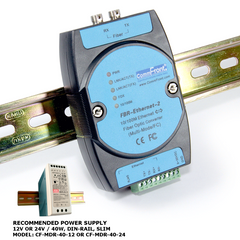
FBR-Ethernet-2 (MM/FC)
10 / 100M Ethernet to Fiber Optic Media Converter (Industrial / MultiMode / FC)
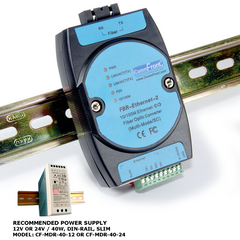
FBR-Ethernet-2 (MM/SC)